Beyond Zoom: Enhancing Remote Work with VR Collaboration Tools
The shift to remote work has brought numerous challenges, particularly in collaboration and communication. Traditional video conferencing tools like Zoom have been the backbone of remote collaboration, but they lack the depth and interactivity that many teams need to work effectively.

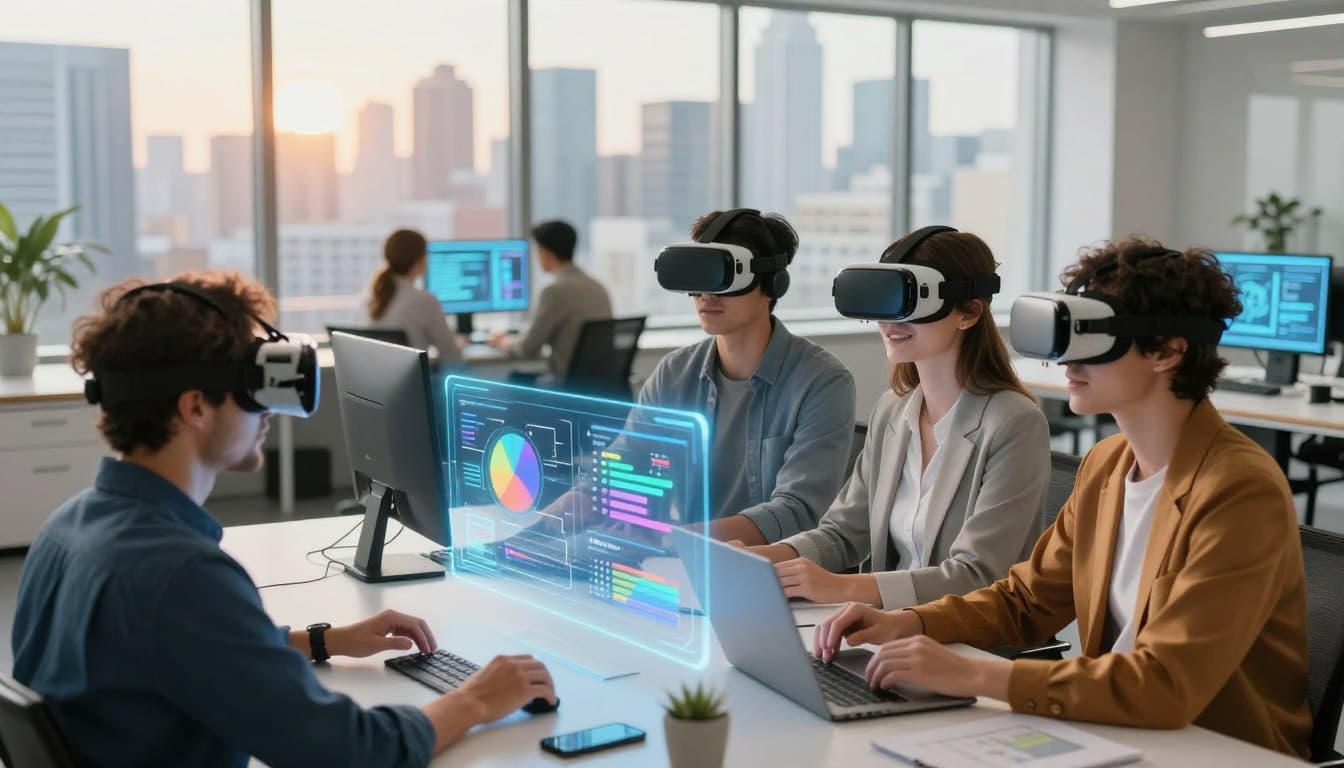
VR collaboration tools are emerging as a powerful solution, offering immersive and interactive environments that can significantly enhance remote work. By leveraging virtual reality, teams can collaborate in a more engaging and productive way, regardless of their physical location.
This new approach to remote collaboration is not just about replacing traditional tools; it's about creating a more dynamic and inclusive work environment. As remote work continues to evolve, the integration of VR collaboration tools is set to play a crucial role in shaping the future of work.
Key Takeaways
- Traditional video conferencing tools have limitations in terms of interactivity and engagement.
- VR collaboration tools offer a more immersive and interactive environment for remote teams.
- The use of VR can enhance productivity and collaboration in remote work settings.
- VR collaboration is poised to revolutionize the way remote teams work together.
- The future of remote work will likely involve a significant shift towards VR collaboration tools.
The Current State of Remote Collaboration
As companies continue to embrace flexible work arrangements, the need for effective remote collaboration tools has never been more pressing. The way teams work together has undergone a significant transformation, driven by technological advancements and changing workforce demographics.
The Rise of Distributed Teams
The trend towards distributed teams has been gaining momentum over the past decade. With the advancement of technology and the globalization of businesses, companies are no longer confined to a single geographical location. This shift has brought numerous benefits, including access to a broader talent pool and improved work-life balance for employees. remote teams are becoming the norm, rather than the exception.
Limitations of Video Conferencing Tools
Despite the widespread adoption of video conferencing tools, remote collaboration still faces significant challenges. Tools like Zoom and Skype have become indispensable, but they often lead to "Zoom fatigue" and lack the interpersonal interaction that physical presence affords. The limitations of these tools highlight the need for more immersive and interactive collaboration challenges solutions.
Virtual Reality: The Next Frontier in Remote Work
The future of remote work is taking shape in virtual reality, offering a more immersive and engaging collaboration experience. As we continue to navigate the challenges of distributed teams, VR technology is emerging as a powerful tool to bridge the gap between remote workers.
How VR Differs from 2D Collaboration Tools
Virtual reality collaboration tools differ significantly from their 2D counterparts by providing a more immersive and interactive environment. Unlike traditional video conferencing tools, VR enables users to engage in a shared virtual space, fostering a sense of presence and community among team members.
- Interactive 3D models: Allow for more intuitive collaboration on complex projects.
- Spatial audio: Enhances the sense of presence by allowing users to pinpoint the source of sounds.
- Avatar representation: Provides a more personal and engaging way to interact with colleagues.
The Science of Presence and Immersion
The effectiveness of VR in remote collaboration is rooted in its ability to create a sense of presence and immersion. Presence refers to the feeling of being physically located in a virtual environment, while immersion is the psychological state of being fully engaged in that environment.
Studies have shown that higher levels of presence and immersion can lead to improved collaboration outcomes, including enhanced creativity and problem-solving skills. By leveraging VR technology, remote teams can achieve a more engaging and productive collaboration experience.
Key Benefits of VR Collaboration for Remote Teams
As remote teams continue to grow, the need for more immersive and interactive collaboration tools has become increasingly evident. Virtual Reality (VR) collaboration is emerging as a powerful solution, offering numerous benefits that can enhance the remote work experience.
Enhanced Spatial Awareness and Natural Interaction
One of the key advantages of VR collaboration is the enhanced spatial awareness it provides. Unlike traditional video conferencing, VR allows team members to interact in a more natural way, using gestures and body language. This immersive experience fosters a sense of presence, making interactions feel more authentic and engaging.
Combating Zoom Fatigue and Digital Burnout
Prolonged use of video conferencing tools can lead to "Zoom fatigue" and digital burnout. VR collaboration offers a refreshing alternative, allowing team members to take breaks from screens and interact in a more relaxed environment. By reducing the strain associated with traditional video conferencing, VR can help improve overall well-being and productivity.
Building Team Culture in Virtual Spaces
VR collaboration tools enable teams to build a strong culture in virtual spaces. Team members can gather in virtual meeting rooms, participate in team-building activities, and socialize in a more natural way. This helps to foster a sense of community and belonging, even among remote teams. By leveraging VR, organizations can create a more cohesive and collaborative work environment.
In conclusion, VR collaboration offers a range of benefits for remote teams, from enhanced spatial awareness and natural interaction to combating Zoom fatigue and building team culture. As the technology continues to evolve, it's likely to play an increasingly important role in shaping the future of remote work.
Leading VR Collaboration Platforms for Business
The shift towards virtual reality is transforming the way companies collaborate, with several VR platforms emerging as leaders in the business space. These platforms are redefining remote work by offering immersive, interactive environments that foster creativity and productivity.
Meta Horizon Workrooms
Meta Horizon Workrooms is a VR collaboration platform that integrates with popular productivity tools. It allows teams to meet, brainstorm, and work together in a virtual environment. With features like virtual whiteboards and screen sharing, it's an ideal solution for businesses looking to enhance remote collaboration.
Microsoft Mesh
Microsoft Mesh is another prominent VR collaboration platform that enables teams to interact and collaborate in a shared virtual space. It's designed to work seamlessly with Microsoft's suite of productivity tools, making it a great choice for businesses already invested in the Microsoft ecosystem.
Spatial.io
Spatial.io offers a robust VR collaboration environment that focuses on delivering a highly immersive experience. It supports a wide range of VR headsets and includes features like 3D modeling and screen sharing, making it suitable for industries that require complex visualizations.
Arthur and Other Enterprise Solutions
Arthur is a VR collaboration platform designed specifically for enterprise use, offering features like virtual meeting rooms and integrations with popular business tools. Other platforms, such as VRChat for Business and AltspaceVR, also provide unique solutions tailored to different business needs.
Here's a comparison of these leading VR collaboration platforms:
| Platform | Key Features | Target Audience |
| Meta Horizon Workrooms | Virtual whiteboards, screen sharing, productivity tool integration | Remote teams, businesses using Meta tools |
| Microsoft Mesh | Shared virtual spaces, integration with Microsoft productivity tools | Businesses invested in Microsoft ecosystem |
| Spatial.io | 3D modeling, screen sharing, supports multiple VR headsets | Industries requiring complex visualizations |
| Arthur | Virtual meeting rooms, integrations with business tools | Enterprises, large businesses |

As businesses continue to explore the potential of VR collaboration, these platforms are at the forefront, offering innovative solutions to enhance remote work. By understanding the unique features and strengths of each platform, companies can make informed decisions about which tools best suit their needs.
Essential Hardware for Virtual Reality Collaboration
Investing in the right VR hardware is crucial for effective virtual reality collaboration in business settings. As organizations increasingly adopt VR for remote work, understanding the essential hardware components becomes vital.
Business-Grade VR Headsets
Business-grade VR headsets are designed to offer higher performance, better graphics, and more robust features compared to consumer-grade models. For instance, headsets like the Oculus Quest 2 and HP Reverb G2 provide advanced capabilities such as higher resolution, wider fields of view, and improved tracking systems. These features are essential for creating immersive and interactive virtual environments that can significantly enhance collaboration.
When selecting a VR headset for business use, factors such as comfort, ease of use, and compatibility with existing systems should be considered. "The right VR headset can make all the difference in creating a seamless and productive virtual collaboration experience," as noted by industry experts.
Peripheral Devices and Accessibility Options
In addition to VR headsets, peripheral devices play a crucial role in enhancing the VR collaboration experience. These may include advanced controllers, spatial audio devices, and high-resolution cameras. For example, advanced hand-tracking technology allows users to interact with virtual objects more naturally, enhancing the sense of presence and immersion.
Accessibility is also a key consideration. Ensuring that VR collaboration tools are accessible to all employees, including those with disabilities, is crucial. This can involve implementing features such as customizable controls, voice commands, and other assistive technologies to make VR environments more inclusive.
Implementing VR Collaboration in Your Organization
Implementing VR collaboration tools requires a strategic approach to maximize their potential benefits. As organizations look to enhance remote work experiences, a well-planned implementation is crucial for success.
Assessing Organizational Readiness
Before diving into VR collaboration, it's essential to assess your organization's readiness. This involves evaluating your current technology infrastructure, identifying potential use cases, and determining the training needs of your employees. Consider the following factors:
- Existing hardware and software compatibility
- Network bandwidth and internet connectivity
- Employee familiarity with VR technology
- Potential applications for VR collaboration
Budgeting and Return on Investment Analysis
A thorough budgeting and ROI analysis is critical for justifying the investment in VR collaboration tools. Consider the costs of hardware, software, training, and potential infrastructure upgrades. Compare these costs to the expected benefits, such as increased productivity, reduced travel expenses, and improved collaboration.
| Cost Component | Initial Cost | Ongoing Cost |
| VR Headsets | $500 per unit | $100 per unit (maintenance) |
| Software Subscription | $0 (initial) | $10 per user/month |
| Training and Support | $1,000 (initial) | $500 per quarter |
Employee Training and Adoption Strategies
Successful implementation of VR collaboration tools depends on effective employee training and adoption strategies. Start by providing comprehensive training sessions, followed by ongoing support and resources. Encourage feedback and monitor usage to identify areas for improvement.
Key strategies include:
- Comprehensive onboarding programs
- Regular training updates
- User support resources
- Monitoring and feedback mechanisms
By following these steps, organizations can ensure a smooth transition to VR collaboration, maximizing its potential to enhance remote work experiences.

Integrating VR with Existing Work Tools and Processes
To maximize the benefits of VR in the workplace, it's crucial to integrate it with our current productivity suites and processes. This integration can significantly enhance the way teams collaborate and work together, even when they're not physically in the same location.
Connecting VR to Productivity Suites
One of the key aspects of VR integration is connecting it to productivity suites like Microsoft 365 or Google Workspace. This allows users to access familiar tools and services within the VR environment, making it easier to adopt and use VR for daily tasks. For instance, users can schedule meetings, edit documents, and manage projects all from within the VR platform.
File Sharing and Collaborative Document Editing
Effective collaboration in VR also requires seamless file sharing and collaborative document editing capabilities. Many VR collaboration platforms now support importing and exporting files to and from popular cloud storage services. This enables teams to work on documents together in real-time, using VR to visualize and interact with the content in a more engaging way.
Calendar and Meeting Management
Integrating VR with calendar and meeting management systems streamlines the process of scheduling and joining virtual meetings. Users can receive meeting invites, join with a single click, and manage their VR meeting schedule just as they would with traditional video conferencing tools. This integration helps maintain a consistent workflow and reduces the learning curve for adopting VR collaboration.
| Integration Feature | Description | Benefit |
| Productivity Suites | Access to tools like Microsoft 365 or Google Workspace within VR | Increased familiarity and ease of use |
| File Sharing | Import and export files to and from cloud storage services | Enhanced collaboration and data accessibility |
| Meeting Management | Integration with calendar systems for scheduling VR meetings | Streamlined workflow and reduced complexity |
Real-World Applications of VR Collaboration
The integration of VR in business processes is opening new avenues for collaboration, creativity, and efficiency. As organizations continue to adopt remote work models, the demand for more immersive and interactive collaboration tools is on the rise.
Product Design and Engineering Reviews
VR collaboration is revolutionizing the product design and engineering review process. Teams can now collaborate on 3D models in a virtual environment, allowing for more detailed and interactive reviews. This not only enhances the design process but also reduces the time and cost associated with physical prototypes.
Virtual Training and Onboarding
Virtual training and onboarding are becoming increasingly popular as companies look for more effective ways to integrate new employees into their teams. VR provides an immersive learning experience, allowing new hires to practice and learn in a simulated environment. This approach has been shown to improve knowledge retention and reduce the time it takes for new employees to become productive.
Immersive Marketing and Customer Presentations
VR is also being used to create immersive marketing experiences and customer presentations. Companies can now showcase their products or services in a highly interactive and engaging way, allowing customers to explore features and benefits in a virtual environment.
Executive Meetings and Strategic Planning Sessions
Even at the executive level, VR collaboration is making an impact. Leaders can hold virtual meetings and strategic planning sessions in immersive environments, fostering more effective communication and decision-making.
| Application | Benefits | Impact |
| Product Design and Engineering Reviews | Enhanced collaboration, reduced prototyping costs | Improved design quality, faster time-to-market |
| Virtual Training and Onboarding | Immersive learning, improved knowledge retention | Faster onboarding, increased productivity |
| Immersive Marketing and Customer Presentations | Engaging customer experiences, enhanced product showcases | Increased customer engagement, improved sales |
| Executive Meetings and Strategic Planning Sessions | Effective communication, immersive decision-making | Better decision-making, improved leadership alignment |
These real-world applications demonstrate the versatility and potential of VR collaboration across various business functions. As the technology continues to evolve, we can expect to see even more innovative uses of VR in the workplace.
Overcoming Barriers to VR Adoption
The adoption of VR technology in the workplace is not without its challenges, including technical, accessibility, and security concerns. Organizations must address these barriers to successfully integrate VR collaboration tools into their operations.
Technical Challenges and Solutions
One of the primary technical challenges is ensuring that the VR hardware and software are compatible with existing IT infrastructure. Investing in robust, business-grade VR headsets and maintaining a reliable internet connection can mitigate some of these issues. Additionally, organizations should consider implementing a dedicated support team for VR-related technical issues.
Addressing Accessibility and Inclusion
VR collaboration tools must be accessible to all employees, including those with disabilities. Designing VR environments with accessibility in mind can help ensure inclusivity. This includes providing alternative interaction methods and ensuring that virtual environments are navigable by users with various abilities.
Security, Privacy, and Compliance Considerations
Security is a critical concern when adopting VR technology, particularly regarding data privacy and compliance with regulations such as GDPR. Organizations should conduct thorough risk assessments and implement appropriate security measures, such as encryption and secure authentication protocols.
| Barrier | Challenge | Solution |
| Technical | Compatibility issues | Invest in business-grade VR hardware |
| Accessibility | Inclusivity for employees with disabilities | Design accessible VR environments |
| Security | Data privacy and compliance | Implement encryption and secure authentication |
Conclusion: Embracing the Future of Remote Collaboration
The future of remote collaboration is taking shape, and Virtual Reality (VR) is at the forefront of this revolution. As we've explored throughout this article, VR collaboration tools offer a more immersive, engaging, and productive way for remote teams to work together. By leveraging VR, businesses can overcome the limitations of traditional video conferencing tools and create a more dynamic and interactive work environment.
As VR technology continues to evolve, we can expect to see even more sophisticated VR collaboration platforms emerge. The future of remote collaboration will be characterized by increased presence, immersion, and interaction. Companies like Meta, Microsoft, and Spatial are already pioneering this space, developing innovative solutions that are set to transform the way we work.
Embracing VR collaboration is not just about adopting new technology; it's about reimagining the future of work. By investing in VR, organizations can enhance team culture, improve productivity, and stay ahead of the curve in an increasingly competitive business landscape. As we look to the future, it's clear that VR collaboration will play a pivotal role in shaping the future of remote collaboration.